


Poughkeepsie Journal
3.150.00 Reviews
App Specs
- Version
- 8.10.3
- Updated On
- License
- Free
- Downloads
- 10,000+
- Developer
- USA TODAY Co.
- Categories
- News & Magazines
- Platform
- Android
Screenshots




 Analysis by AppCompare
When I want a quick sense of what is happening around Poughkeepsie, I do not always want to open a broad national news service and dig through stories that have little to do with my day. Poughkeepsie Journal is built for that more focused habit. It is a free news and magazines app from USA TODAY Co., centered on local reporting while still giving me access to wider news, photography, and video.
My first impression is that its value depends heavily on where I live and how closely I follow the Hudson Valley area. This is not an all-purpose replacement for every news source on my phone. It works better as a local starting point: I open it looking for nearby developments, community stories, and regional context, then move outward to national coverage when the subject calls for it. If local relevance matters more to you than having the largest possible news feed, this app has a clear reason to exist.
From a local question to a useful news routine
I like beginning a local news routine with a question rather than an open-ended scroll: what do I need to understand about Poughkeepsie today? That keeps a quick check purposeful and helps me decide when a story merits a closer read. The next section looks at how that focused habit can make the app more useful without turning every visit into a long session.
Starting with the right expectation
The app’s store short description is simply “Poughkeepsie Journal,” which tells me more about its identity than its feature set. I approach it as a digital edition of a local newspaper rather than as a social feed, a personalized search engine, or a general magazine reader. That distinction affects how I use it. I am not expecting every headline to be tailored to my interests, and I am not opening it only for breaking national stories.
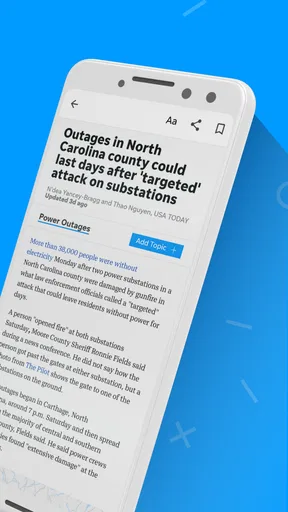
The broader store summary points to local and national news, strong photography, and video content. In practice, that combination makes sense for a reader who wants a local anchor without giving up larger stories. A nearby government decision, school development, road issue, or community event can sit beside coverage that explains what is happening beyond the region. The local angle is the reason to install it; the broader material helps keep the app from feeling too narrow.
The app is rated for Everyone 10+, so it is positioned for a general audience rather than a specialist readership. I would still use ordinary judgment when handing a news app to a younger reader, because news can involve difficult subjects even when the platform is not aimed at adults only. For most households, though, the age rating makes it a reasonably accessible option for following community affairs together.
My step-by-step reading flow
I begin with a simple question: what has changed locally since I last checked? That question gives the session a purpose. Instead of scrolling without an end point, I look for the stories that affect my immediate area, then check whether a related national or regional article adds useful background. This approach keeps the app from becoming another endless stream competing for attention.
Worth Reading Before You Choose

EA SPORTS FC Mobile 26 Is a Bigger Football Game, but It Takes Time

Flipboard Shows What News Apps Must Do Beyond the Feed

Switching to Android Auto Means Rethinking Your Driving Routine

Google Calendar Makes a Crowded Week Easier to Manage

Ludo King Makes the Most of the Minutes Between Plans

Baby Panda World Brings Quick Play to Modern Phones, but Its Game Library Feels Busy
The first useful handoff is from headline to article. Local headlines often need more context than a short notification can provide, especially when a decision involves public bodies, neighborhoods, or ongoing events. I read far enough to understand who is affected, what has happened, and whether the story is a finished event or something still developing. That habit matters more here than simply counting how many headlines I can skim.
When a story includes photography or video, I treat that material as a second layer rather than an automatic improvement. A photograph can make a local event easier to understand, while video may provide a stronger sense of place or show details that text cannot. At the same time, visual content can slow down a quick check, particularly when I only need the basic facts before leaving for work. I prefer to read the core article first and use the media when it genuinely adds context.
A practical routine is to separate quick checks from deeper sessions. In a quick check, I scan local headlines and open only the items that could affect my plans or understanding of the area. In a longer session, I follow related coverage and compare the local angle with national reporting. This two-stage workflow is more comfortable than treating every article, image, and video as equally urgent.
How the app fits into an everyday situation
Imagine I am planning a drive, arranging a weekend activity, or trying to understand why a familiar part of town is suddenly being discussed. I open the app before making assumptions based on a social post or a short message from someone else. I look for the relevant local story, read the article rather than relying on the headline, and then use any available visual coverage to build a clearer picture.
The outcome is not necessarily a final answer in one tap. The useful result is a better starting point for a decision: whether to allow extra travel time, follow an issue more closely, discuss it with family, or look for an official update. That is where a local news app can beat a general news homepage. It begins closer to the question I actually have.
There is also a household use case. One person may care about community developments, another about regional news, and someone else may prefer visual coverage. The app can serve as a shared reference point for conversation, but I would not assume that every reader will want the same depth. A short visit works for keeping up; a longer visit is better when the story has consequences beyond the headline.
Where handoffs become important
News rarely ends inside one article. I may read a local report, send the key point to a friend, and then move to an official source or another publication for a decision that affects money, travel, health, or legal responsibilities. Poughkeepsie Journal is useful at the discovery and explanation stages, but I would not use any single news app as the only authority for a time-sensitive decision.
This is especially important with developing stories. A local report can tell me what is known at the time of publication, while an official notice may later provide the operational detail I need. My preferred workflow is therefore: use the app to understand the issue, note the important names and locations, and then verify practical instructions through the responsible organization when necessary.
Sharing also changes the way I read. If I am passing a story to someone else, I try to include why it matters instead of forwarding a headline without context. A local headline can be meaningful to one neighborhood and irrelevant to another. The app gives me a useful starting point, but the handoff works best when I explain the connection to the recipient.
For readers who mainly consume news through social platforms, this extra step may feel slower. The trade-off is that a dedicated local publication gives the story a clearer editorial home. Social feeds are convenient for discovering what people are discussing, but they can mix commentary, incomplete details, and unrelated reactions. I prefer using them as a signal that something deserves checking, not as the final version of the story.
Photography and video: helpful, but not always necessary
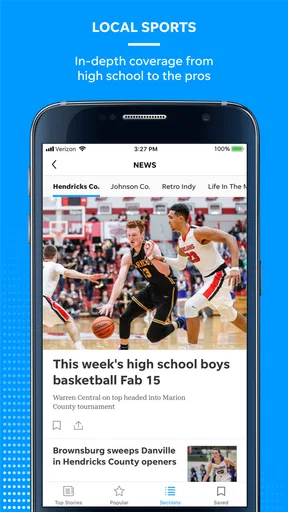
The visual side of the app is one of its more appealing qualities. Local photography can communicate scale and atmosphere in a way that a short paragraph cannot. For community events, changing locations, or scenes that are difficult to describe, the image may be the fastest route to understanding. Video can be even more useful when movement, sound, or a sequence of events matters.
My advice is to treat visual material as a deliberate choice. If I am checking headlines on a limited break, I stay with text. If I am trying to understand what a location or event actually looked like, I spend the extra time with the image or video. This small distinction makes the app feel less demanding and prevents the richer presentation from turning every visit into a longer session than intended.
Visual storytelling also changes the emotional weight of news. A photograph may make a local story feel immediate, which can be valuable, but it can also make a difficult subject harder to skim casually. I appreciate having that context, while still choosing when I have the attention to process it properly.
What the numbers suggest about the app’s position
Poughkeepsie Journal has an average rating of 3.1 from around 117 ratings, with roughly 50 written reviews. I read that as a sign to keep expectations measured. The app clearly serves a particular audience, but the rating does not suggest that every reader will find the experience flawless. I would install it because of the local coverage, not because I expect universal praise.
Its reach is listed at over 10 thousand installs, which is modest compared with national news platforms. That is not automatically a weakness. A publication focused on one area does not need the audience size of a worldwide service to be useful to the people it covers. Still, the smaller footprint reinforces the point that this is a targeted choice, not the obvious single news app for everyone.
The app has been available since April 2012 and is currently at version 8.10.3. I see that long presence as evidence that the publication has had time to adapt its digital offering, while the current version signals ongoing maintenance. Neither detail guarantees a perfect experience, so I still judge it by how efficiently it helps me move from a local question to a reliable understanding.
Cost, access, and the subscription decision
The download is free, but in-app purchases range from $9.99 to $69.99 per item. That makes the initial decision easy and the longer-term decision more personal. I can try the app without paying at the door, then decide whether the amount of local reporting I use justifies any purchase presented inside the app.
I would not subscribe or buy anything simply because I installed it. First, I would spend enough time checking whether the available coverage matches my routine: local stories I care about, readable articles, and a comfortable balance between quick updates and deeper reporting. If I only open the app occasionally, the free experience may be sufficient for my needs. If it becomes my regular local news source, a paid option may make more sense, but that depends on the value I personally get from continued access.
This is a useful distinction from many general news alternatives. A national aggregator may offer more topics in one place, while a local publication can provide better relevance for a particular community. The trade-off is that the specialized app may feel less worthwhile on days when local news is not part of my immediate routine. I would choose based on frequency of use, not on the size of the headline list.
Device compatibility and practical friction
The listed minimum operating system is version 8.0, so the app is aimed at devices that are not running an extremely old mobile platform. If I am using an older phone, I check compatibility before planning around it. That is a small step, but it avoids the frustration of building a daily habit around an app the device cannot comfortably run.
News apps also compete with limited attention, storage, battery, and mobile data. I am more careful with photography and video when I am away from a stable connection, especially if I only want a few headlines. The visual content is valuable when it adds meaning, but it is not necessary for every visit. Keeping that distinction in mind helps me use the app economically rather than letting every session expand automatically.
The biggest practical friction is not the presence of local coverage; it is deciding how deeply to go. A reader who wants one rapid national briefing may find the local focus too specific. Someone who wants to follow community developments may find that specificity exactly right. The app rewards a clear purpose more than passive scrolling.
Who should use it, and who should skip it
I would recommend Poughkeepsie Journal to residents, former residents who still follow the area, and anyone whose daily decisions are connected to local developments. It is also a sensible companion for readers who already use a national news service but feel that their immediate community receives too little attention there. The combination of local reporting, broader news, photography, and video gives those readers a more grounded routine.
I would be less enthusiastic for someone who wants a single app devoted almost entirely to national or international headlines. That reader will probably get more value from a broad news service with extensive topic controls. I would also hesitate to recommend it to someone who dislikes publication-based reading and prefers a fully customizable feed assembled from many sources.
It is not the right tool for replacing official alerts, emergency instructions, or professional advice. Its role is to help me discover and understand news, not to become the sole source for every practical decision. That boundary is important, especially when a story is changing quickly.
The result after using it as a routine
Used intentionally, the app gives me a local-first path through the news. I start with what may affect my area, read for context, use photography or video when it improves understanding, and then hand off important details to official or specialized sources when needed. The result is a more useful picture than a quick glance at a generalized feed, even if it takes a little more attention.
My main reservation is that the moderate rating and relatively small install base suggest an experience that may not satisfy every reader. I would approach it as a focused publication app, not as a polished universal news command center. Its success depends on whether Poughkeepsie-area coverage is genuinely part of my life.
Overall, I think Poughkeepsie Journal is worth trying for readers who want their local news to sit at the center of their mobile routine. The free starting point lowers the risk, while the visual reporting and national material add useful depth. I would keep another source available for wider coverage and official confirmation, but for moving from a local question to a clearer understanding of what is happening nearby, this app has a practical and specific role.
Pros
- Covers local news
- events
- and community issues in the Hudson Valley.
- Offers breaking-news alerts for important developments in the area.
- Includes sports coverage for local schools and regional teams.
- Digital edition provides convenient access when you are away from home.
- Search tools make it easier to find older articles and specific topics.
Cons
- Many full articles may require a paid subscription to read.
- Some content can feel highly focused on the Poughkeepsie area.
- Frequent notifications may become distracting without customization.
- The app may use considerable storage for downloaded newspaper content.
- Loading times can vary when browsing on slower mobile connections.
FAQs for Poughkeepsie Journal
What is the Poughkeepsie Journal app used for?
The Poughkeepsie Journal app provides access to local news and information from the Poughkeepsie and Mid-Hudson Valley area. It typically includes breaking news, community stories, local politics, sports, entertainment, weather updates, and opinion content. The app is designed for readers who want to follow regional developments from a mobile device instead of relying only on the newspaper’s website.
Is the Poughkeepsie Journal app free to download and use?
The application is generally free to download, but access to all of its articles and features may depend on the publication’s subscription policy. Some stories can be available without payment, while frequent reading or premium content may require a digital subscription or an existing newspaper account. Before downloading, users should review the current pricing, trial terms, and access limits shown in the app store.
Can I read Poughkeepsie Journal articles without an internet connection?
Offline reading depends on the version of the application and the features currently supported by the publisher. Some news apps allow users to save selected stories or download content for later, while others require an active internet connection whenever an article is opened. If offline access is important to you, check the app description and settings after installation for download or saved-story options.
Does the Poughkeepsie Journal app send breaking-news notifications?
Yes, the app may offer push notifications for breaking news, major local events, weather developments, sports results, and other important updates. Notifications can be useful for staying informed about the Hudson Valley, but they may become frequent depending on your selected topics. You can usually enable or disable alerts, and in some versions choose which categories are allowed to notify you.
Is the Poughkeepsie Journal app available for both Android and iPhone?
The Poughkeepsie Journal is commonly offered through official mobile applications or mobile-optimized services for both Android and iOS devices, although availability can vary by region, operating-system version, or publisher updates. For security, download it only from Google Play or Apple’s App Store and verify the developer name. Compatibility, subscription features, and the exact app design may differ between platforms.


